software

Install your Windows from USB flash drive (Pen drive) – WinToFlash

1

WinToFlash is a windows software for transfer your Windows XP, Windows 2003, Windows Vista, Windows 2008, Windows 7 and Windows 8 Setup from CD or DVD to USB flash drive.And use the USB flash drive to install windows to your computer or netbook.

Main Features

Transfer Windows XP/2003/Vista/2008/7/8 Setup to a USB drive
Transfer WinPE to a USB drive
Erase USB media, full or quick

Create a USB drive with emergency bootloader for Windows XP/2003
Transfer MS-DOS to a USB drive
Create a USB drive with Windows XP/2003 Recovery Console

Download WinToFlash

Example: install Windows xp from USB flash drive(Pen drive)

Requirements

minimum 1 GB USB flash drive
windows xp setup cd

Step 1: create bootable win xp USB drive

1.Download and extract WinToFlash

http://wintoflash.com/download/en/

2.Insert you windows xp cd and USB flash drive

3.Open WinToFlash.exe (Run as administrator in windows 7 and vista).Change the task for other windows versions by click the advanced mode tab

4.Click windows Setup transfer wizard button and then Next.

5.Select your windows and USB flash drive locations and click next
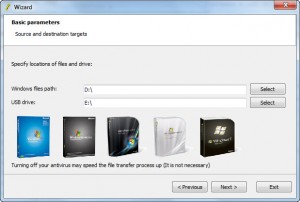
6.Accept the terms and click continue.And click finish after successful transfer.

7.Remove your cd and USB drive

Step 2:Install from USB

8.Insert your USB drive and restart your computer.when computer starts go to you boot menu and select your USB or go to your BIOS Setup and set the first boot preference as USB Hard Disk.

9.Then Choose “TXT Mode Setup”.After completing the partition, formatting and copying file to computer, it will restart again.

10.Now choose the “GUI Mode Setup” and complete your installation.

If you enjoyed this article, Get email updates (It’s Free)
avatar
Author :  

Hello visitor! Subscribe to the RSS feed or subscribe via email to receive updates.

Browse related articles

Now Available Windows 8 Upgrade Offer Registration Now Available Windows 8 Upgrade Offer Registration

Microsoft has announced that Windows 8 Upgrade Offer has now open.This offer is only available for people who have bought or will buy a new Windows 7 PC between June 2, 2012 and January 31, 2013.Eligible user will be able to upgrade to Windows 8 Pro for only $14.99. Just go to Windows Upgrade Offer [...]

Mac OS X Mountain Lion Transform pack for windows 7, windows 8 and xp Mac OS X Mountain Lion Transform pack for windows 7, windows 8 and xp

If you like Mac OS X Mountain Lion but you still using windows 7, windows 8 and windows xp then this is for you. Support: Windows 7 Windows 7 SP1 Windows 8 Windows XP X86(32Bit) and X64(64Bit) Best Work in X86(32Bit) All Language Versions Note : Please unistall old or other version of skin packs [...]

Windows 8 official launch date – October 26 Windows 8 official launch date – October 26

Microsoft announced Windows 8 release date and it will be available to users starting October 26, 2012.And the Release to Manufacturing version (RT)of Win 8 is set to hit the first week of August. If you enjoyed this article, Get email updates (It’s Free) Tweet Pin It

Windows Server 2012 Essentials beta released Windows Server 2012 Essentials beta released

Windows Server 2012 Essentials beta is now available for download and testing.It supports the applications need to run business and also helps to quickly connect to additional cloud-based applications and services to extend server’s functionality. Main features: full client PC backup access your resources from virtually everywhere using almost any device easy use and manage [...]

One Comment on Install your Windows from USB flash drive (Pen drive) – WinToFlash

  1. avatar Nagappan says:

    Your job is good well done

Leave a Reply