outlook

Outlook.com a brand new email service from Microsoft

0

Microsoft has announced a new email platform Outlook.com.This is the new Hotmail, which is now called Outlook.

What’s new in Outlook.com?

Clean Interface metro UI
social integration
SkyDrive integration
Skype integration

Just go to Outlook.com  and sign up for Outlook.com mail account.

You can also upgrade your account to Outlook.com from Hotmail.com or Live.com email address.

To Upgrade to Outlook.com

Login to Hotmail.com.
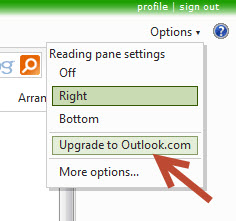
2.Clock “Options” menu and then select “Upgrade to Outlook.com”
To Create a Outlook alias

1.Click the Outlook options icon and select More mail setting.
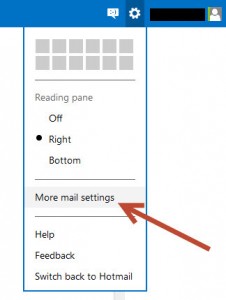

2.The select Create a Outlook alias under Managing your account section.
3.Type you address and click Create an alias.
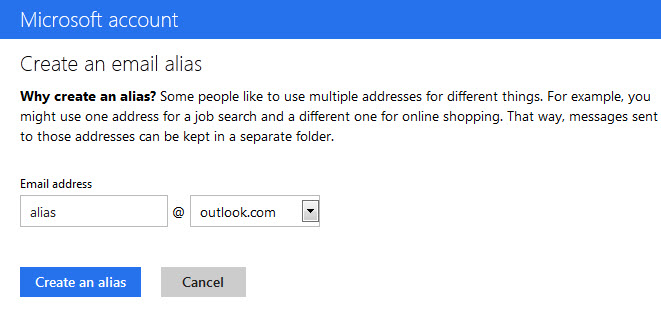

4.select your Inbox or a new folder for your outlook address.

Note: You will still receive email in your hotmail address.

To Rename your email address

1.Click the Outlook options icon and select More mail setting.
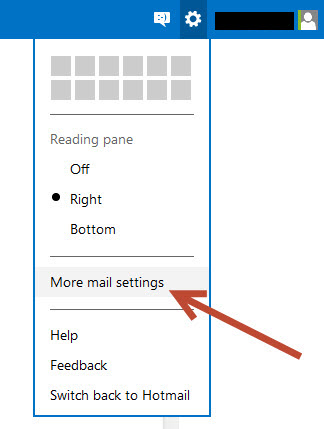

2.The select Rename your email address under Managing your account section.
3.Type you address and click Save button.
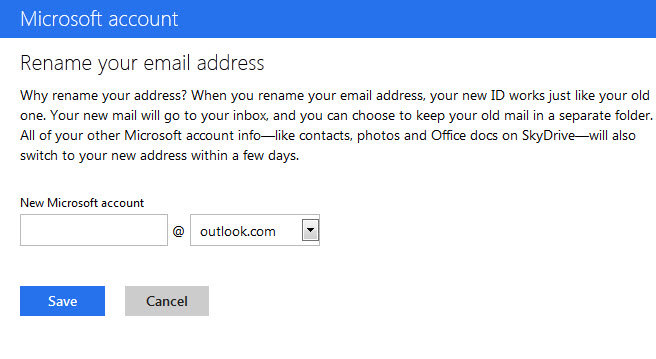
Note: When you rename your email address,Your new mail will go to your inbox, and you can choose to keep your old mail in a separate folder (Here two seperate mail address). All of your other Microsoft account info—like contacts, photos and Office docs on SkyDrive—will also switch to your new address within a few days.

If you enjoyed this article, Get email updates (It’s Free)
avatar
Author :  

Hello visitor! Subscribe to the RSS feed or subscribe via email to receive updates.

Browse related articles

Windows 8.1 public preview available on June 26 Windows 8.1 public preview available on June 26

Microsoft’s Tami Reller has announced that upcoming major update for Windows 8 and RT will officially be called Windows 8.1 and Owners of current Windows 8 and RT devices will be able to download the public preview on June 26th and it will be free. If you enjoyed this article, Get email updates (It’s Free) [...]

SkyDrive adds new photo timeline SkyDrive adds new photo timeline

Microsoft announced some new features to SkyDrive website. New features: 1.All of your photos in SkyDrive across all your albums and folders based on a timeline view. 2.TPhotos are organized into groups by event and time. 3.scroll down to navigate through all the images. 4.quickly navigate by a month name. 5.view all your photos in [...]

400 million active outlook.com users 400 million active outlook.com users

Microsoft has announced that more than 400 million active Outlook.com accounts, including 125 million that are accessing email, calendar and contacts on a mobile device using Exchange ActiveSync.Microsoft also said that the company has finished moving its Hotmail.com users over to Outlook.com.And more than 150 petabytes of email data in six weeks. Microsoft also added [...]

Outlook.com app for Android updated Outlook.com app for Android updated

Microsoft has released a update to Outlook.com app for Android. What’s new in this release? New look and feel (Complete new design based on Modern UI) New Filters for unread and flagged messages New Conversation threading Added Marking messages as junk Download Outlook.com app for Android from google play store If you enjoyed this article, [...]

Leave a Reply