
In ubuntu you can install microsoft windows fonts using below methods. First install Microsoft’s TrueType Core fonts.This font pack contains Andale Mono, Arial, Arial Black, Comic Sans MS, Courier New, Georgia, Impact, Times New Roman, Trebuchet, Verdana, and Webdings font.
Terminal method:
1.Open your terminal. To open terminal click the Dash home from unity launcher.And type terminal in the search field. And click Terminal. And type the below command.
sudo apt-get install ttf-mscorefonts-installer
Type your ubuntu password if needed. It will install the microsoft core fonts.
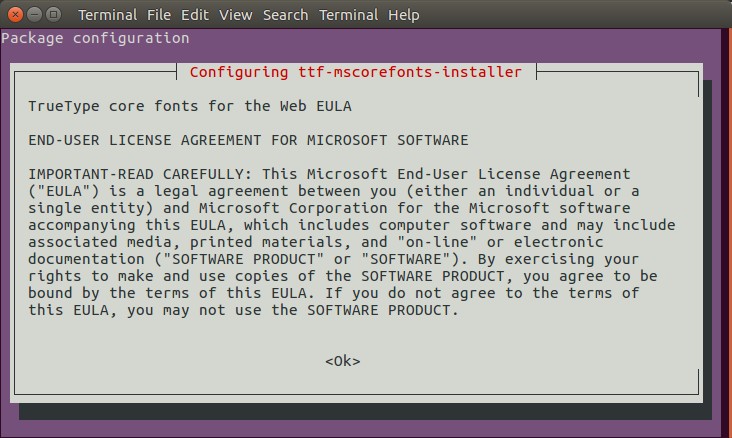
If it ask the confirm the license agreement , then follow below step.When the license agreement appears, use the arrow and Page Down/Page Up keys to scroll and then press the TAB key and select OK and press enter.
Now select Yes using the arrow key and press enter.
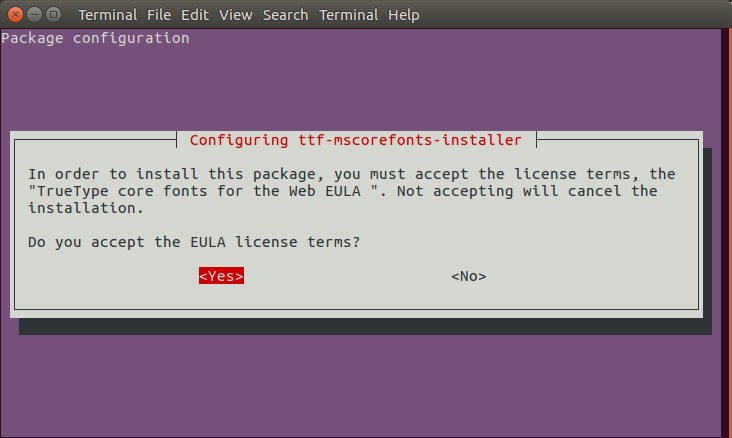
Note: You can also download the Microsoft’s TrueType Core fonts by clicking this link. and double click the downloaded file and install via Ubuntu software center.
Then install Microsoft’s ClearType fonts. This font pack contains Constantia, Corbel, Calibri, Cambria, Candara, and Consolas.
Type below command in terminal and press enter.
mkdir .fonts
wget -qO- http://plasmasturm.org/code/vistafonts-installer/vistafonts-installer | bash
Then restart Ubuntu.
Watch Video:
Copy from windows Method:
Copy windows True Type fonts(TTF) directly from windows and create a new folder in Ubuntu’s Home folder and name it “Fonts“ and paste the fonts.Then Rename the folder “Fonts” to “.Fonts” to hide the folder.Restart ubuntu.
[OR]
Copy windows True Type fonts(TTF) directly from windows and create a new folder in Ubuntu’s Home folder and name it “Fonts“ and paste the fonts.just open each font and click install button below the font viewer.
Synaptic Package Manager Method: (For old version of Ubuntu. Not recommended)
1. Open your Synaptic Package Manager. To open Synaptic Package Manager,go to System->Administration->Synaptic Package Manager (Enter your login password for authorization).
2. Type
ttf mscorefonts
in quick search bar.
3. Right click ttf-mscorefonts-installer and select mark for installation.
4. Then click on Apply.
Works like a charm! Thanks a lot buddy ! Saved my day !