
Update:
To install BitDefender Antivirus Scanner for Unices on ubuntu 15.10: click Here
1.Go to BitDefender Antivirus Scanner for Unices license key request page to request a license key and download link.
2.Once you received the email from BitDefender,click the download link and download the “BitDefender-Antivirus-Scanner-7.6-4.linux-gcc4x.i586.deb.run” file(for 32 bit) on your desktop.
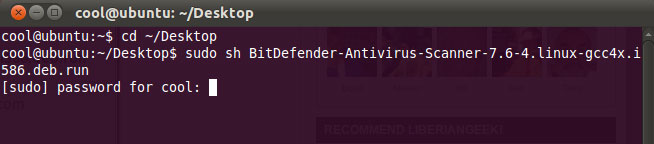
3.Oper the terminal and type
cd ~/Desktop
and hit enter.
4.Type
sudo sh BitDefender-Antivirus-Scanner-7.6-4.linux-gcc4x.i586.deb.run
and hit enter.And type ubuntu password.
5.press enter key untill it show the 100%.
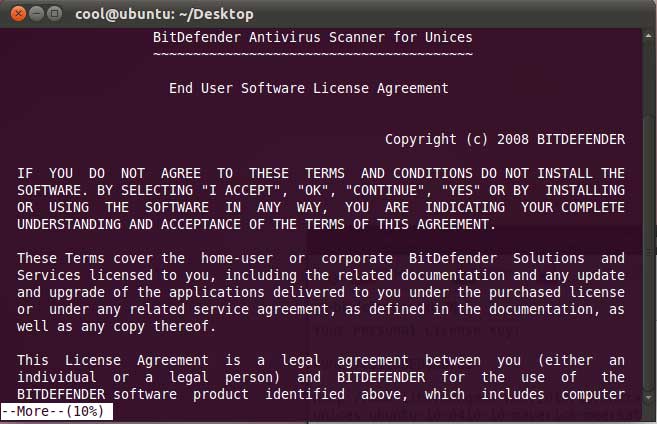
6.Then type accept and press enter.
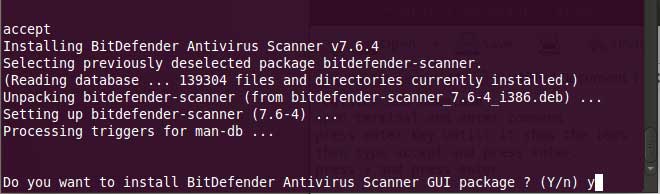
7.Type y and press enter when it ask to install BitDefender Antivirux Scanner GUI package.
8.After the successful installation exit from terminal.

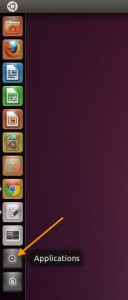
9.Open BitDefender Antivirus Scanner for Unices.To open BitDefender Antivirus Scanner for Unices, click Applications icon from unity launcher. And type BitDefender in the search applications field.And click BitDefender Antivirus Scanner to open BitDefender Antivirus Scanner.
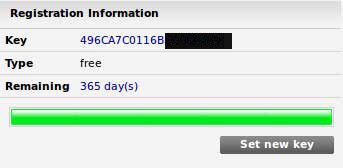
10. close tip of the day and click set new key button and enter your key and click set.

12 Update and scan your system.

I got my license from the email they sent me but every time I set the new key, nothing happens. Help, anyone? Thanks!
restart ubuntu and try again. for latest version check this link https://connectwww.com/install-bitdefender-antivirus-scanner-for-unices-7-7-1-on-ubuntu-15-10/4410/
I installed Avast! with no major problems.
I visited the downloadpage after getting the key in my mail
gcc4x.i586.deb.run
My processorven sounded all the time as loud as never before.
Nothing happened further.
Then I openened the terminal and typed:
cd ~/Desktop
No such sirectory
Then I typed:
sudo sh BitDefender-Antivirus-Scanner-7.6-4.linux-gcc4x.i586.deb.run
No such command
So, as often with Linux: to complicated for a normal user.
Hi,
I want to download Bit defender for Mint Nadia. On the download page of Bit defender, there are so many files and i do no know which one should i download. Would you please let me know which file should i download. My Pc is 64 bit (intel) and Mint Nadia is installed on it.
Should i download amd64 debian or i358 debian file?
Thanks
i586 will run on all including the x86_64 Intel and AMD processors.
x86_64 will run only on x86_64 architecture.
Try i586 deb first.
hallo,
I have the key and download link but impossible to download the file
is there any option
many thanks for yr advice
shall I reload bitdef virus scanner
impossible ? .Use download manager.
Works beautifully … if you follow the instructions carefully =)
Tip : right-click download link & choose Save Link As (Firefox)
After updating my BIT DEFENDER, it is not working, as it try to load anti virus engines, it disappear. I tried to restart my computer. But nothing is happened. Help me what i should do?
remove completely and try again
How do I un-install BitDefender ?
Good works
Plz Note the file size is 40 MB
download to desktop.
type in terminal
cd ~/Desktop
hit enter and then type below code or copy paste from here(only from this comment not from post)
sudo sh BitDefender-Antivirus-Scanner-7.6-4.linux-gcc4x.i586.deb.run
Note:check the downloaded file version (for me 7.6-4)
and follow the rest
Ok downloaded text file to desktop,all ok when I type in cd ~/Desktop, but when I add sudo sh BitDefender-Antivirus-Scanner-7.6-4.linux-gcc4x.i586.deb.run and type my password, I first get the message
‘Sorry, try again.’ I type the same password and then get the message ‘sh: Can’t open BitDefender-Antivirus-Scanner-7.6-4.linux-gcc4x.i586.deb.run’
It seems that I am unable to run a ‘sudo sh’ command. Is this a password issue? or should I be doing something to enable the use of ‘sudo sh’?
I am relatively new to using the terminal so any advice would be appreciated. Thanks…
I am trying to download BitDefender, I received the license key and clicked on the link in the email. I browsed to the Linux folder and clicked on the .i586.deb.run file, but it just changes the browser to show the code, I don’t think it is downloading. What should I see after clicking on the .deb file?
follow the steps carefully
Hello,
I try to install Bitdefender for ubuntu 64 bits using: BitDefender-Antivirus-Scanner-7.6-4.linux-gcc4x.amd64.deb.run but when enter the password it doesn’t work.
Please help me.
Thanks
type your ubuntu password correctly
My friends the password was from the user account of ubuntu. all is ok. Thanks