wordpress

3 Best wordpress plugins to Protect your blog from right click, text selection, image dragging

0

Professional budget Web hosting starts from $2.00. Cpanel -Control Panel,Softaculous -Auto Script Installer.PHP and Mysql.RVSkin

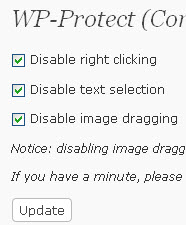
WP-Protect

WP-Protect wordpress plugin protect blog content from getting copied.Wp-Protect Features are disable right clicking,disable text selection,disable image dragging.

1. Download WP-Protect wordpress plugin. Download link.

2. Unzip and upload it to your WordPress wp-content/plugins directory.

3. Login to wp-admin. In your admin dashboard click plugins and activate the WP-Protect wordpress plugin.
4. Then go to Settings menu and select WP-Protect.

5. select options and click Update.
Blog Protector

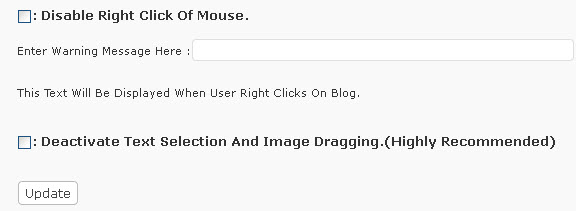
Blog Protector wordpress plugin protect WordPress site against right clicks, text selection, and image dragging.

1. Download Blog Protector wordpress plugin. Download link.

2. Unzip and upload it to your WordPress wp-content/plugins directory.

3. Login to wp-admin. In your admin dashboard click plugins and activate the Blog Protector wordpress plugin.

4. Then go to Settings menu and select Blog Protector.

5. check the  Options and click Update.
WP-CopyProtect

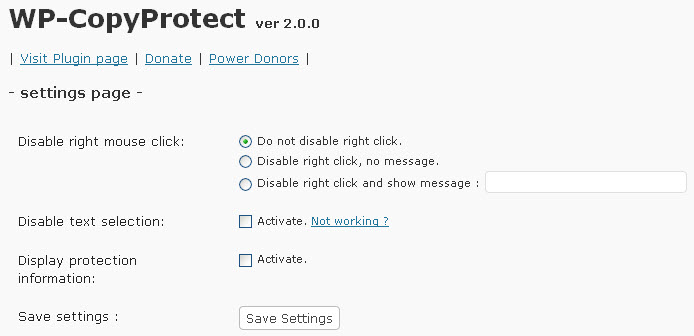
WP-CopyProtect wordpress plugin developed to stop the Copy cats.WP-CopyProtect features are disable selection of text,disable right click on your blog and Search engines can read the content without any problem.

1. Download WP-CopyProtect wordpress plugin. Download link.

2. Unzip and upload it to your WordPress wp-content/plugins directory.

3. Login to wp-admin. In your admin dashboard click plugins and activate the WP-CopyProtect wordpress plugin.

4. Then go to Settings menu and select WP-CopyProtect.

5. check the Options and click Save Settings.
20% lifetime off - Tekecho Web hosting

avatar
Author :  

Hello visitor! Subscribe to the RSS feed or subscribe via email to receive updates.

Browse related articles

WordPress Popup contact form WordPress Popup contact form

Professional budget Web hosting starts from $2.00. Cpanel -Control Panel,Softaculous -Auto Script Installer.PHP and Mysql.RVSkin Popup contact form is a free wordpress plugin to add the popup contact form on your wordpress site. Main features: Ajax submission. Unblockable. To install Popup contact form Login to wordpress (wp-admin). In your admin dashboard click plugins and select [...]

WP AdminTools – additional wordPress, SEO and database features WP AdminTools – additional wordPress, SEO and database features

Professional budget Web hosting starts from $2.00. Cpanel -Control Panel,Softaculous -Auto Script Installer.PHP and Mysql.RVSkin WP AdminTools is a free wordpress plugin that gives many useful seo and database features to your wordpress site. Main features: Disable Revisions or Trash Feature manually set the Auto Save Interval Restrict your Blogs search results automatically generate optimized [...]

db redirect – Redirect your mobile users to another URL db redirect – Redirect your mobile users to another URL

Professional budget Web hosting starts from $2.00. Cpanel -Control Panel,Softaculous -Auto Script Installer.PHP and Mysql.RVSkin db redirect is a free wordpress plugin to redirect your mobile users to another alternative URL.You can specify this URL in the admin panel. To install db-redirect Login to wordpress (wp-admin). In your admin dashboard click plugins and select Add [...]

3pagination wordpress plugin 3pagination wordpress plugin

Professional budget Web hosting starts from $2.00. Cpanel -Control Panel,Softaculous -Auto Script Installer.PHP and Mysql.RVSkin 3pagination is a free wordpress plugin and it allows you to navigate to any page between 1 and 999 with no more than 3 clicks. To install 3pagination Login to wordpress (wp-admin). In your admin dashboard click plugins and select [...]