
For JDK 6 click here : How to install jdk6 on ubuntu
To install Oracle JDK 7 on ubuntu 12.04
1.Go to Oracle JDK7 download page. And download the latest linux jdk in .tar.gz format.
Here its (32 bit) jdk-7u4-linux-i586.tar.gz.

2.Copy your JDK .tar.gz file to your Desktop.
3.Open Terminal.To open terminal click the Dash home from unity launcher.And type terminal in the search field.And click Terminal.
4.Type the below code in terminal and hit enter to extract in Home folder.
tar -xvf ~/Desktop/jdk-7u4-linux-i586.tar.gz
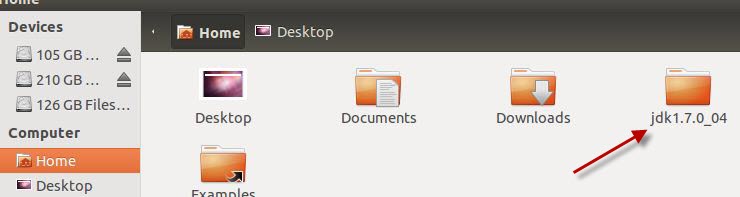
5.Next Type below command in terminal to create a new folder.
sudo mkdir -p /usr/lib/jvm/jdk1.7.0
Type your ubuntu password if needed and press enter.
6.Now type below command to move files.
sudo mv jdk1.7.0_04/* /usr/lib/jvm/jdk1.7.0/
Note:change this (jdk1.7.0_04) according to your jdk version.
Example: for JDK 7 update 5 use jdk1.7.0_05
7.Type below command in terminal and hit enter.
sudo update-alternatives --install "/usr/bin/java" "java" "/usr/lib/jvm/jdk1.7.0/bin/java" 1
8.Then type below command in terminal and hit enter.
sudo update-alternatives --install "/usr/bin/javac" "javac" "/usr/lib/jvm/jdk1.7.0/bin/javac" 1
9.Then type below command in terminal and hit enter.
sudo update-alternatives --install "/usr/bin/javaws" "javaws" "/usr/lib/jvm/jdk1.7.0/bin/javaws" 1
10.After the successful installation,to check the installed version type
java -version

Pingback: How to install and configure Android SDK, Eclipse and ADT Plugin on Ubuntu | CONNECTwww.com
very thank you so much
Thanks so much for these instructions. Worked like a charm!
A THOUSAND ‘thank you’s for these instructions!!!
you may have to run “sudo update-alternatives –config java” after following these instructions
I followed the instructions (on LinxMint 13), but still got:
# java -version
java version “1.6.0_24”
OpenJDK Runtime Environment (IcedTea6 1.11.1) (6b24-1.11.1-4ubuntu3)
OpenJDK Server VM (build 20.0-b12, mixed mode)
Yeah, I’m also funning Linux Mint Maya and got the same thing. Tried typing “sudo update-alternatives –config java” and was presented with a choice between pressing 0 for OpenJDK 1.6 auto m, 1 for OpenJDK 1.6 manual, and 2 for 1.7.0 manual. I pressed 2. Hope that was correct.
Pingback: How to install jdk on ubuntu 11.10 | CONNECTwww.com