
To install Netbeans IDE on Ubuntu 12.04 Click Here
NOTE: JDK 6 is required for installing and running the Java SE, Java EE and All NetBeans Bundles.
To install JDK on ubuntu click here
1.Go to Netbeans download page and download the netbeans Linux (x86/x64) .sh installer file (like netbeans-7.0.1-ml-linux.sh).
2.Copy your Netbeans installer file to your Desktop.
3.Open Terminal.To open terminal click the Dash home from unity launcher.And type terminal in the search field.And click Terminal.
4.Type the below code in terminal and hit enter.
cd Desktop
5.Then type below code in terminal and hit enter
sudo chmod +x netbeans-*
Type your ubuntu password if needed and press enter.
6.Then type below code and press enter
sudo ./netbeans-*
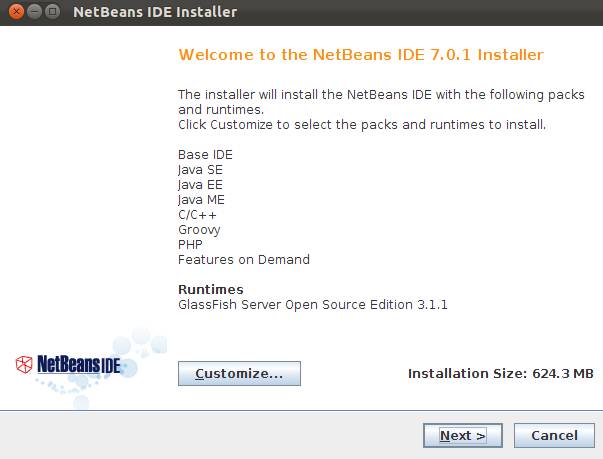
7.And then install Netbeans from GUI installer window.
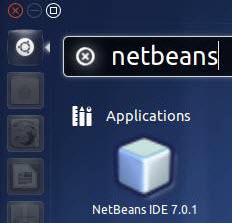
After the successful installation,click the Dash home from unity launcher.And type netbeans in the search field.And click Netbeans IDE 7.0.1 to open.

Pingback: How to Setup Netbeans in Ubuntu 11.10 with Ruby Environment | jglifonea
It doesn’t work for me and I follow the instructions carefully. The GUI in step 7 never shows up. Nothing happens.
follow the INSTRUCTIONS CAREFULLY
thank youuu so much ..
On installation it showing some error on terminal like:
Cant initialize
Running in headless mode.
please help …
remove openjdk and install oracle JDK
https://connectwww.com/how-to-install-oracle-jdk-7-on-ubuntu-12-10/2910/
Thank you,,it help me a lot..
thx!
thanks
Hi,
I want to access windows share files to edit in netbeans anybody has solution for it?
thanks dear it helps me a lot
finally!!! thnx A LOT!!!!!!!!!!!
thankyou
VlW mesmo!!! sua dica resolveu meu problema. tudo de bom pra vc. Abraço.
Pingback: How to install Netbeans IDE on ubuntu 12.04 | CONNECTwww.com
Fantastic! Thank you so much. A well explained tutorial 🙂
That was one fantastic explanation on installing Netbeans in Ubuntu… You should really make more such help files for newbie Linux Users… Thanks Mate
thank you very much body
thank you so much!I tried several other commands to install Netbeans, but ended in vain. but your post helped me ! THANK YOU!
Thank You …..
Thank you very much …you have done a great job, the guide works very will I got Netbeans working on my ubuntu11.10. so thank you very much.
Thank you.
Maybe you could also explain why this works and just double clicking doesnt! Of course, chmod is the key – but newbies will thank you more!
cheers
Thanks, it worked with no problem! very easy to follow.
Thank you !
very helpful explanation,
specially sixth part.
Regards.
this article help me so much thumbs up to the person who post this article.
Thanks, it works just one more question /usr/local/netbeans
can we start netbeans manually without going to the unity launcher from desktop
can we create the desktop launcher for it ?
if yes the please mention the steps for it.
Thanks Once Again.
Please also mention the steps for removing it either manually or through synaptic package manger.
is it a good idea to install netbeans in /home so that we can have permission control over the files?
Looking forward for your comments.
refer
https://connectwww.com/create-desktop-shortcuts-in-ubuntu-11-10/1625/
https://connectwww.com/how-to-create-website-shortcuts-in-ubuntu-11-10-desktop/1515/
Can`t initialize UI
That is The Erorr displayed to me
What is the solution ?
Please, Reply …
follow the INSTRUCTIONS CAREFULLY
Thankx for the help.It worked perfectly.
Top stuff – thanks a bunch – great tut
Can now run Jasper Ireport
Pingback: Making the change from ASP.net and Windows to php and Linux | KimIT
thanks man the stuff has just worked