ubuntu

How to install Gnome schedule on ubuntu

0

Gnome schedule is a graphical user interface tool to schedule tasks on your computer. It supports recurrent (periodical) tasks and tasks that happen only once in the future.

Main features:

Supports custom titles and icons for your tasks.
Templates support.
If run as root, you can edit any user’s crontab and “at” tasks.
Human-readable strings like “Every hour” instead of “0 * * * *”
Advanced mode for crontab experts
Provides a “panel applet”
A calendar allows you to choose the day you want a task executed.

To install Gnome schedule on ubuntu

1.Open Terminal.To open terminal click the Dash home from unity launcher.And type terminal in the search field. And click Terminal.

2.Type the below code in terminal and hit enter.

sudo apt-get install gnome-schedule

3.Type your ubuntu password if needed.

4.Type y and hit enter to confirm Gnome schedule installation.

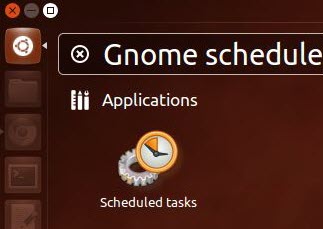
5.After the successful installation click the Dash home from unity launcher.And type Gnome schedule in the search field.Then click scheduled Task.
If you enjoyed this article, Get email updates (It’s Free)
avatar
Author :  

Hello visitor! Subscribe to the RSS feed or subscribe via email to receive updates.

Browse related articles

Ubuntu 13.10 (Saucy Salamander) Release Schedule Ubuntu 13.10 (Saucy Salamander) Release Schedule

Ubuntu 13.10 (Saucy Salamander) is scheduled for release in  17th October, 2013 Ubuntu 13.10 Release Schedule: Ubuntu 13.10 Alpha 1 – June 20th,2013 Ubuntu 13.10 Alpha 2 – July 18th,2013 Ubuntu 13.10 Alpha 3 – August 1st,2013 Ubuntu 13.10 Beta 1- September 5th,2013 Ubuntu 13.10 Final Beta – September 26th,2013 Ubuntu 13.10 Release Candidate – [...]

Linux 3.9 released Linux 3.9 released

Linux 3.9 is now available for download.What’s new in this release? Fix a build warning Fix missing put_cpu_var() in tlb_batch_add_one() when not batching. do not expose broken video output streams disable -mlong-calls compiler option for kernel modules fix atime/mtime regression Provide __ucmpdi2 to resolve undefined references in 32bit builds. Change kunmap macro to static inline [...]

Ubuntu 13.04 Released Ubuntu 13.04 Released

Ubuntu 13.04 (Raring Ringtail) is now available for download. What’s new in ubuntu 13.04? Linux kernel 3.8.8 Unity user interface changes Unity 7 New interface animations, including window snap Scroll-switching of open windows from Unity Launcher New Social Lens Workspace item removed from launcher A new sync menu for Ubuntu One Upstart 1.8 LibreOffice 4.0 [...]

Ubuntu 13.10 codenamed Saucy Salamander Ubuntu 13.10 codenamed Saucy Salamander

Ubuntu 13.10 gets a codename Saucy Salamander, Canonical founder Mark Shuttleworth revealed on his personal blog post. Ubuntu 13.10 is scheduled for release in  late October, 2013 Source: Salamander wiki If you enjoyed this article, Get email updates (It’s Free) Tweet Pin It

Leave a Reply