
To install Drupal 7 on your localhost, you must setup apache and mysql first. We have already posted a tutorial on How to install and configure Apache,PHP,MySql and phpMyadmin on ubuntu.Please read first.
1.Download Drupal 7
Go to Drupal website
and download the latest Drupal 7 version in zip format on your desktop and extract. Now you will get drupal-7.0 folder. just rename that folder to drupal
2.Copy Drupal to /var/www folder .
To do this
Method 1:
Go to Application -> Accessories -> Terminal. And type the below code in terminal and hit enter.
gksudo nautilus
Type your ubuntu password if needed. Just copy and paste the drupal folder from desktop to your /var/www folder.
OR
Method 2:
Go to Application -> Accessories -> Terminal. And type the below code in terminal and hit enter.
cd Desktop
sudo mv drupal /var/www
Type your ubuntu password if needed.
3.Create a database using phpMyAdmin
follow these steps:
For phpmyadmin,apache,mysql,php installation click here
Open your browser and type
http://localhost/phpmyadmin/
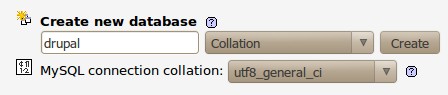
in the address bar and press enter. Type your mysql root username and password to login. choose a name for your drupal database,enter it in the Create new database field, and click Create.
4.Install and configure drupal
Go to Application -> Accessories -> Terminal. And type the below code in terminal and hit enter.
gksudo nautilus
Type your ubuntu password if needed.Go to the default folder in your drupal ie: /var/www/drupal/sites/default . and open default.settings.php file and save as settings.php in the same folder (ie) /var/www/drupal/sites/default/settings.php .
Open your terminal and type the below code and hit enter to change the file permission.
sudo chmod 777 -R /var/www/drupal/sites/default/settings.php
Open
http://localhost/drupal/
in your browser. If you are getting below error “Forbidden You don’t have permission to access /drupal/ on this server”. just change the permission of your drupal folder.To do this
Go to Application -> Accessories -> Terminal. And type the below code in terminal and hit enter.
sudo chmod 777 -R /var/www/drupal
Type your ubuntu password if needed.
Now go to http://localhost/drupal/.
Click Save and continue then click Save and continue.
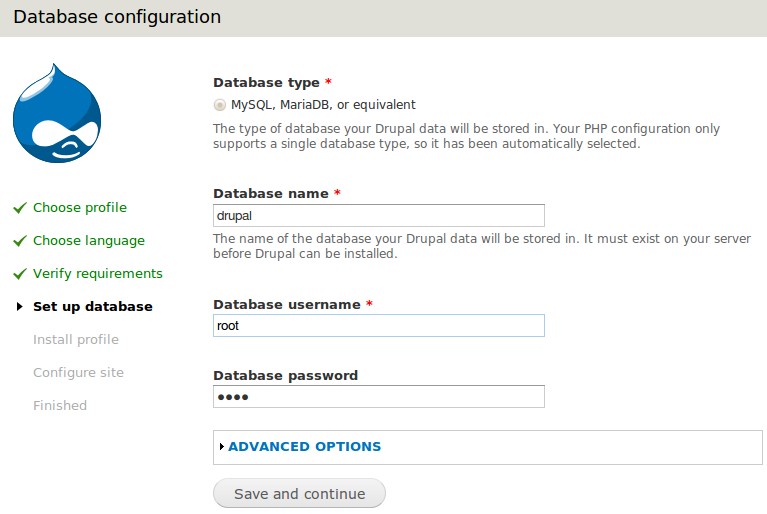
Type your database name,database username,database password and click Save and continue.
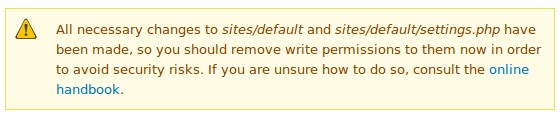
Just avoid the above warning message if you are installing drupal in your test server or if you need it change the permissions.
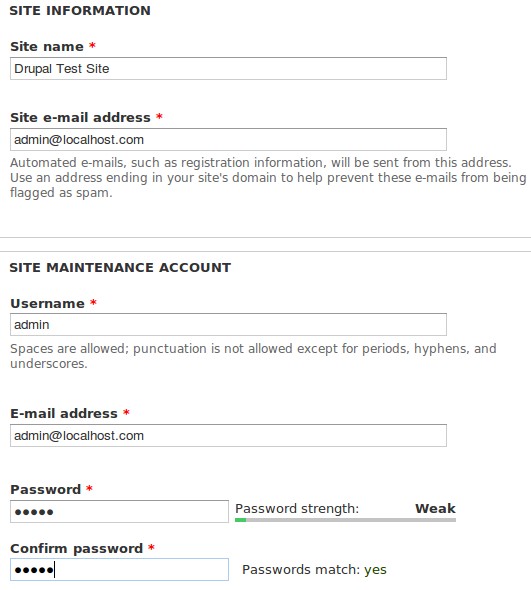
Fill all the mandatory details and click Save and continue.
Click visit your new site or go to http://localhost/drupal/

good article. it worked for me..:)
cheers!
That allowed me to finally get Drupal 7 installed but now everything is 777. How do I adjust permissions after install to make sure the site is secure? Because after I have developed the site I am pushing to production and want to push the write permissions. I think that the sites/default file needs that permissions you mentioned but I think there is more than that. Thank you!
Pingback: Cheat Sheet for Adding Virtual Hosts in Ubuntu | Island of Lost Circuits
Easy install.
Good work.
Thanks.
Beautiful! Worked on Linux Mint no problems! Thanks.
Amazing tut. I have not seen many flowing like this. Bravo.
excellent guide — worked on 1st install
nice eone
Pingback: Installing Drupal Ubuntu - Download Free High Quality Premium WordPress Themes, Joomla, Magento, osCommerce , eCommerce, PrestaShop, ZenCart, Drupal, Envato, HTML, CSS Templates. – Download Free High Quality Premium WordPress Themes, Joomla, Magento