
UFW is a firewall for Ubuntu users and it is available by default in all Ubuntu installations after 8.04 LTS but disabled by default. Actually the Uncomplicated Firewall or UFW is a front-end for iptables and netfilter firewall. It comes with a command-line interface for managing your firewall. Using this you can set incoming policy, incoming rules, IPv4 rate limiting, outgoing filtering, filtering by interface and routed packet filtering. It comes with IPv6, application integration, upstart, phython and rsyslog support.
Enable UFW in Ubuntu
It comes with pre-installed but disabled by default. open your terminal and run this command to enable UFW Uncomplicated Firewall in Ubuntu.
sudo ufw enable
To can check the UFW status by running this command.
sudo ufw status
Disable UFW in ubuntu:
In your terminal run this command to disable UFW in Ubuntu.
sudo ufw disable
Restart UFW on Ubuntu:
sudo ufw restart
Flush UFW:
you can flush the built-in chains, resets the policy to ACCEPT using the below command.
sudo ufw flush-all
For he complete UFW usage details run this command.
ufw --help
Install Gufw Firewall on Ubuntu
If you feel that it is difficult to manage the UFW via command line , then your can install GUFW. Gufw provides user interface for your UFW firewall. Using this you can easily manage your firewall settings in Ubuntu.
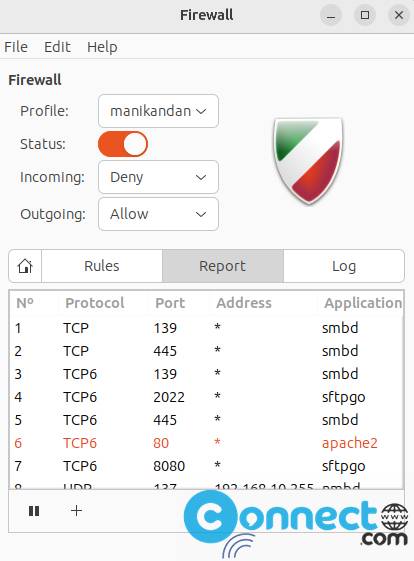
To install GUFW in Ubuntu use this command in your terminal application.
sudo apt update
sudo apt install gufw
You can open Gufw from your application menu or by command line.
gufw
If needed enter your Ubuntu user password. Turn on it and set your firewall rules. Its easy now.
Watch Video


The firewall was activated but still the computer is replying to PING. How can I deactivate PING reply?
please refer
https://help.ubuntu.com/community/UFW
http://ubuntuguide.net/how-to-disable-ping-response-in-ubuntu