
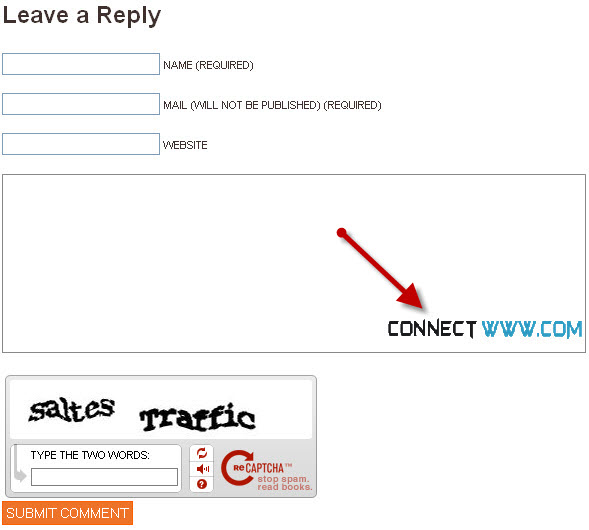
how to add a background image to your wordpress comment box

3

40% lifetime off - Web hosting

Always Backup Before You Change Anything.

Login your wordpress admin.Select Appearance click editor and then Click comments(comments.php).
Find <textarea . Inside that add this code style=”background:url(‘IMAGE URL’) no-repeat right bottom;”

Here IMAGE URL = Your background image path.

And update the file.
The background-position property

eft top
left center
left bottom
right top
right center
right bottom
center top
center center
center bottom


Professional budget Web hosting starts from $1.50. Cpanel -Control Panel,Softaculous -Auto Script Installer.PHP and Mysql.RVSkin

avatar
Author :  

Hello visitor! Subscribe to the RSS feed or subscribe via email to receive updates.

Browse related articles

Google Add to Circle wordpress plugin Google Add to Circle wordpress plugin

40% lifetime off – Web hosting Tweet Share Google Add to Circle is a free wordpress plugin to display and to add your Google+ Page to their circle directly from your website. Features: badge customization. Login to wordpress (wp-admin). In your admin dashboard click plugins and select Add New. Type Google Add to Circle in [...]

HTML5 Slideshow Presentations wordpress plugin HTML5 Slideshow Presentations wordpress plugin

40% lifetime off – Web hosting Tweet Share HTML5 Slideshow Presentations is a free wordpress plugin to create HTML5 slideshow presentations directly from your website. Main features: won’t need to upload to slideshare. host your own presentations. share/present them anytime. completely independent of your installed theme. Login to wordpress (wp-admin). In your admin dashboard click [...]

WP Social Slider – Social Activity Viewer Plugin for WordPress WP Social Slider – Social Activity Viewer Plugin for WordPress

40% lifetime off – Web hosting Tweet Share WP Social Slider is a free wordpress plugin to display social activities in a slick sliding panel. Features: facebook, twitter, google +1. show social share buttons. Login to wordpress (wp-admin). In your admin dashboard click plugins and select Add New. Type WP Social Slider in the search [...]

Worpress Clock Worpress Clock

40% lifetime off – Web hosting Tweet Share Worpress Clock is a free wordpress plugin to display a Flash Clock in any areas of your website. Main Features: It could be used as a Widget. It provides you with a shortcode. Login to wordpress (wp-admin). In your admin dashboard click plugins and select Add New. [...]

3 Comments on how to add a background image to your wordpress comment box

  1. Hello webmaster. I like your post about how to add a background image to your wordpress comment box CONNECTwww.com.

    I was wondering, i am planning to make a blog for myself. I want to use wordpress like you. Where did you get your template? If you post your answer here below, i will read this in the next few day’s.

    Thanks Auto verzekering

  2. avatar admin says:

    check the link next to our copyright notice

  3. avatar iPage says:

    i see how that works, that’s pretty easy..quick tutorial thanks!

Leave a Reply